Your Multi Me Wiki is organised into Sections and Pages, making it easy to find and explore information.
You can use pictures, text, videos and audio to tell your story in your own way.
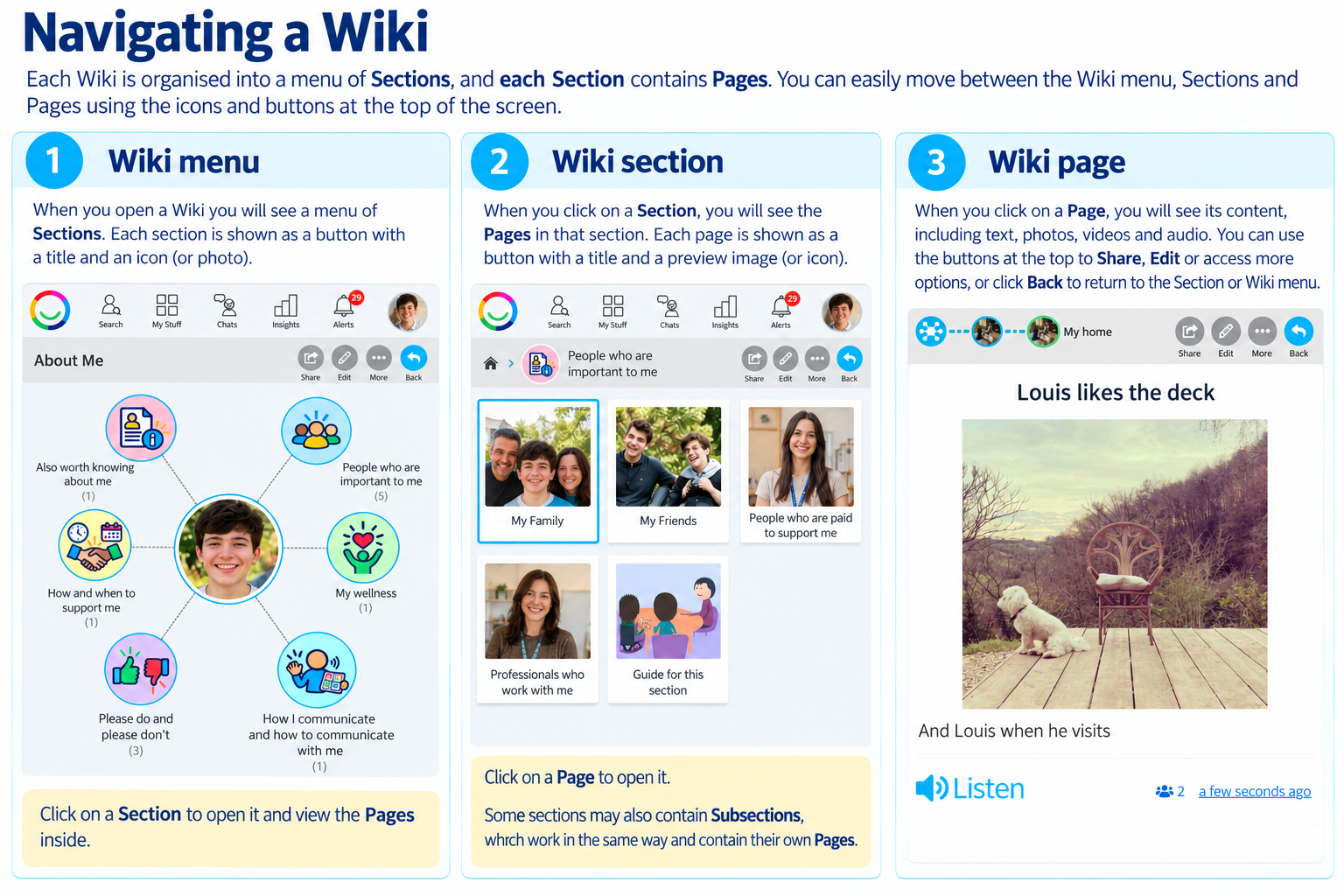
1. Wiki Menu
When you open your Wiki, you will see your Wiki Menu.
Each circle represents a Wiki Section.
Sections have a title and an image or icon.
Click on a Section to explore what's inside.
Some Sections may contain further Subsections.
2. Wiki Sections
When you open a Section, you will see its Wiki Pages.
Each Page appears as a tile with a title and an image or icon.
Click on a Page to open it.
Some Sections may contain Subsections, which open another menu of Pages.
You can use the navigation icons at the top of your Wiki to move between Sections and Pages.
3. Wiki Pages
Wiki Pages are where you share information about yourself, your life and the things that matter to you.
A Wiki Page can contain:
Pictures and photographs
Written text
Videos
Audio recordings and spoken descriptions
You can add more than one post to a Wiki Page. Each post can contain different information, pictures, videos or audio.
Simply scroll down the Page to see all the posts.
If a post includes audio, click the Listen button to hear it.
Moving Around Your Wiki
At the top of your Wiki, you will find useful buttons:
Back – return to the previous Page, Section or Wiki Menu.
Edit – make changes if you have permission.
Share – access sharing options.
More – open additional options.
The navigation icons at the top also show where you are in your Wiki, so you can easily return to an earlier Section.
Make Your Wiki Your Own
Every Wiki is different, just like the person it belongs to.
You can organise your Wiki into Sections and Pages that make sense to you, using pictures, words, videos and audio to help tell your story.
Need help? Ask your Buddy or someone supporting you to help you explore or update your Wiki.
Was this article helpful?
That’s Great!
Thank you for your feedback
Sorry! We couldn't be helpful
Thank you for your feedback
Feedback sent
We appreciate your effort and will try to fix the article