You can rearrange the buttons on your Wiki Main Menu using drag and drop.
You can either Switch two buttons to change their positions or Move a button inside another Section to create a Subsection.
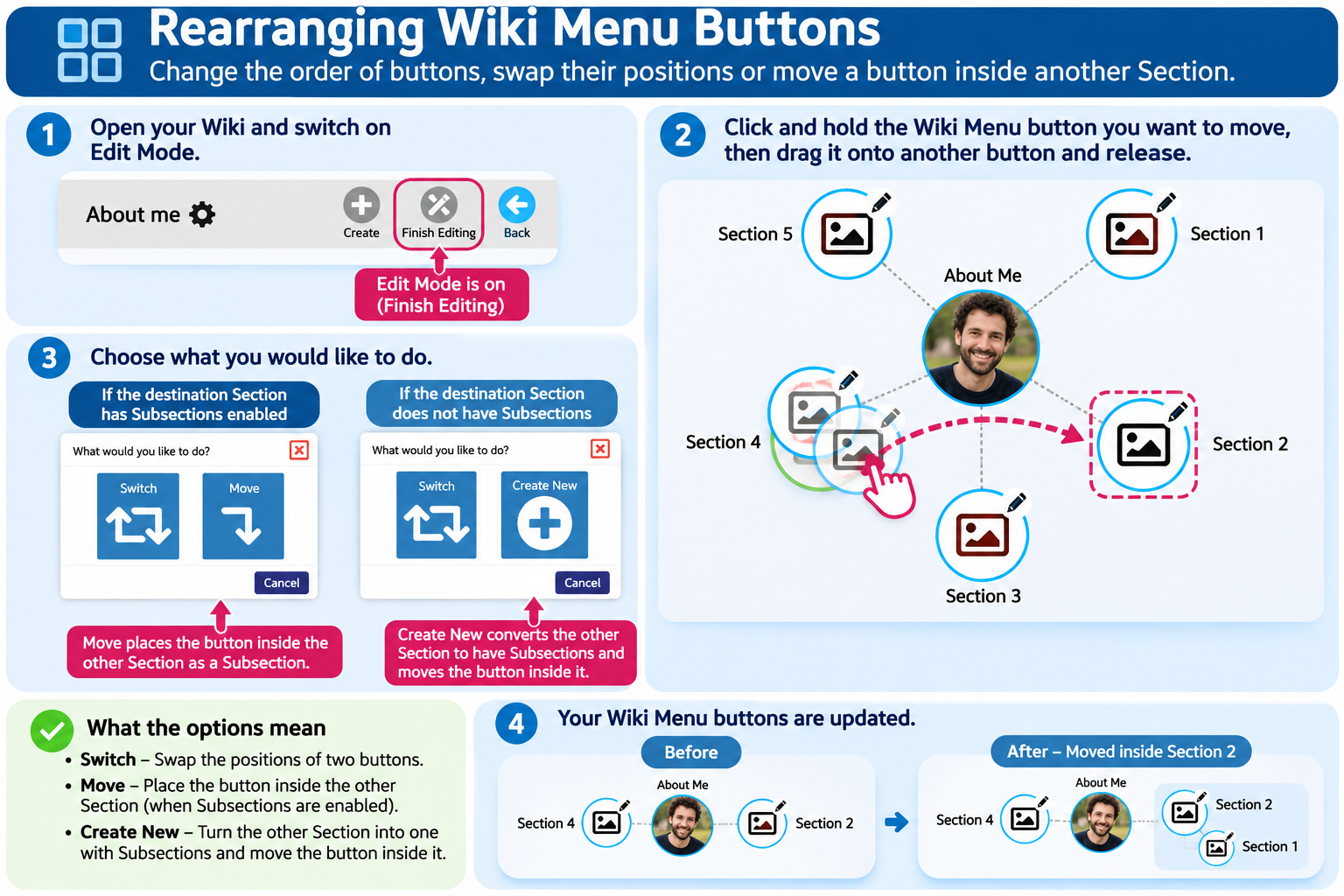
How to Rearrange Wiki Menu Buttons
Open your Wiki and switch on Edit Mode.
Click and hold the Wiki Menu button you want to move.
Drag it onto another Wiki Menu button and release.
A window will appear with options depending on the type of Section you are dragging onto.
Option 1: Switch
Choose Switch to swap the positions of two Wiki Menu buttons.
Both Sections will keep their existing content.
Option 2: Move
If the destination Section already has Subsections enabled, you can select Move.
This places the Section you are dragging inside the destination Section as a Subsection.
Option 3: Create New
If the destination Section does not have Subsections enabled, you will see Create New instead of Move.
Choose Create New to convert the destination Section into one that can contain Subsections.
This allows you to organise Sections within other Sections.
Finishing
When you have finished rearranging your Wiki Menu, click Finish Editing to return to View Mode.
Was this article helpful?
That’s Great!
Thank you for your feedback
Sorry! We couldn't be helpful
Thank you for your feedback
Feedback sent
We appreciate your effort and will try to fix the article