My Circle is your personal network of people on Multi Me.
It helps you stay connected with people who are important to you, such as:
Friends and family
Support staff and carers
Teachers and professionals
Other important people in your life
What can I do with My Circle?
Once someone joins your Circle, you can:
Send them messages and chat with them
Share posts and updates
Give them access to parts of your Wiki, Diary, Goals and other areas of Multi Me
You can choose what you share and who you share it with.
Circle Categories and Groups
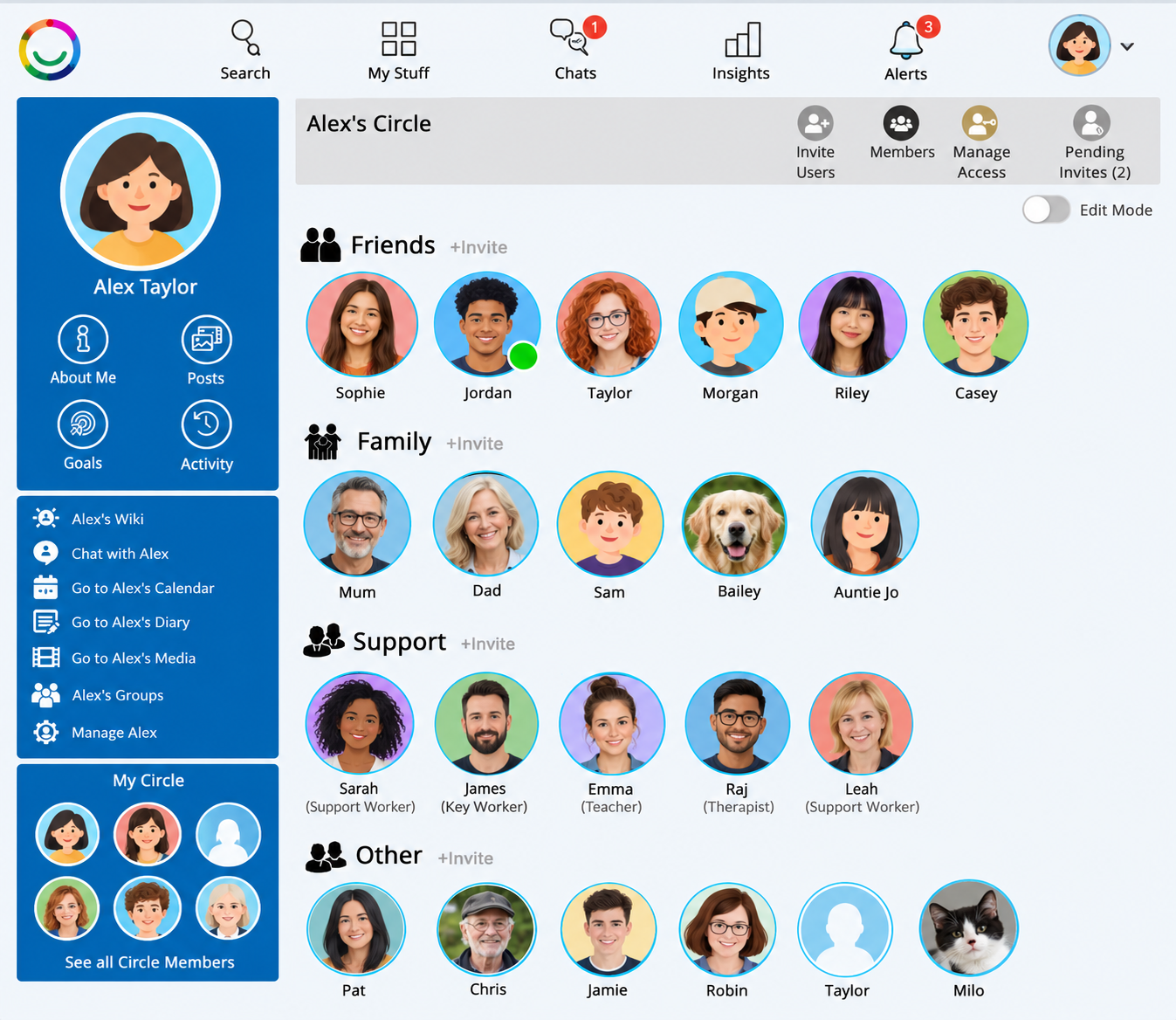
If you are a Supported User, you can organise your Circle into categories such as Friends, Family and Support.
You can also create Circle Groups to help organise people and share information with different groups.
What is a Buddy?
A Buddy is someone you trust to help you use Multi Me.
They might be a family member, key supporter or trusted member of staff.
A Buddy can help manage your account, invitations and sharing permissions.
Finding My Circle
You can find My Circle in your Quickmenu or from your My Stuff Dashboard.
Here you can see the people in your Circle, view their profiles and manage your connections.
Was this article helpful?
That’s Great!
Thank you for your feedback
Sorry! We couldn't be helpful
Thank you for your feedback
Feedback sent
We appreciate your effort and will try to fix the article