You can invite other people on Multi Me to join your Circle.
There are two ways to do this.
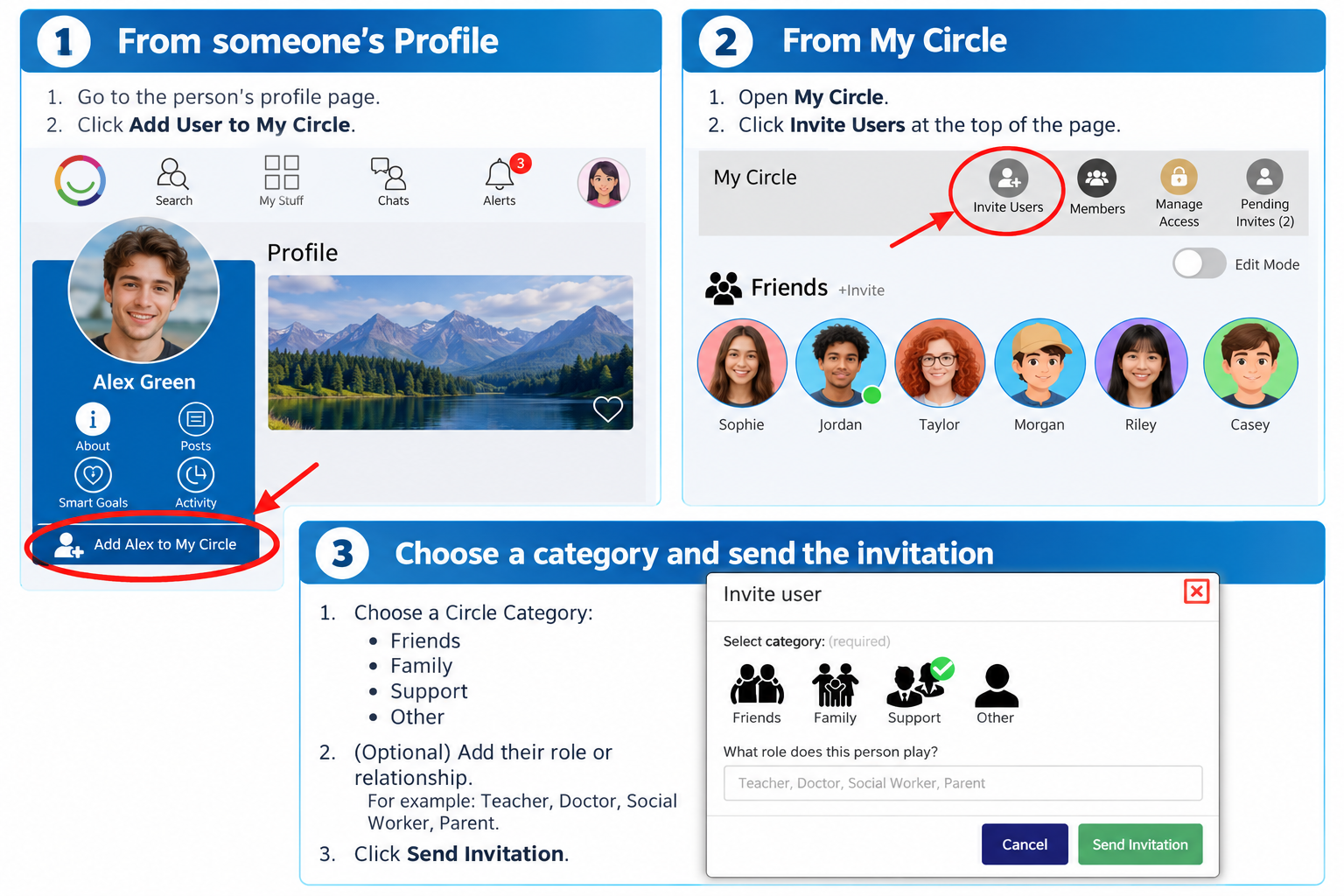
Option 1 – From someone's Profile
Open the person's Profile.
Click Add User to My Circle.
Click Yes to confirm.
Choose a Circle Category, such as Friends, Family, Support or Other.
If you wish, add their role or relationship to you (for example, Friend, Teacher or Support Worker).
Click Invite.
Option 2 – From My Circle
Open My Circle.
Click Invite Users at the top of the page.
Find and select the person you want to invite.
Choose their Circle Category and optionally add their role.
Click Invite.
Who can I invite?
You can only invite people whose profiles are visible to you through your shared Groups on Multi Me.
If you cannot find someone, you may not share a Group with them.
What happens next?
The person will receive a notification inviting them to join your Circle.
Depending on your organisation's settings, your Buddy may need to approve the invitation before the person is added.
Access and Privacy
Adding someone to your Circle does not automatically give them access to your private information.
Circle members can see posts and updates you share with them, but cannot access private areas such as your Wiki, Diary or Goals unless they have been given permission.
Was this article helpful?
That’s Great!
Thank you for your feedback
Sorry! We couldn't be helpful
Thank you for your feedback
Feedback sent
We appreciate your effort and will try to fix the article