You can find events organised by Groups and Communities you belong to, as well as events that other people have invited you to join.
You can then add these events to My Calendar so you can see what's coming up.
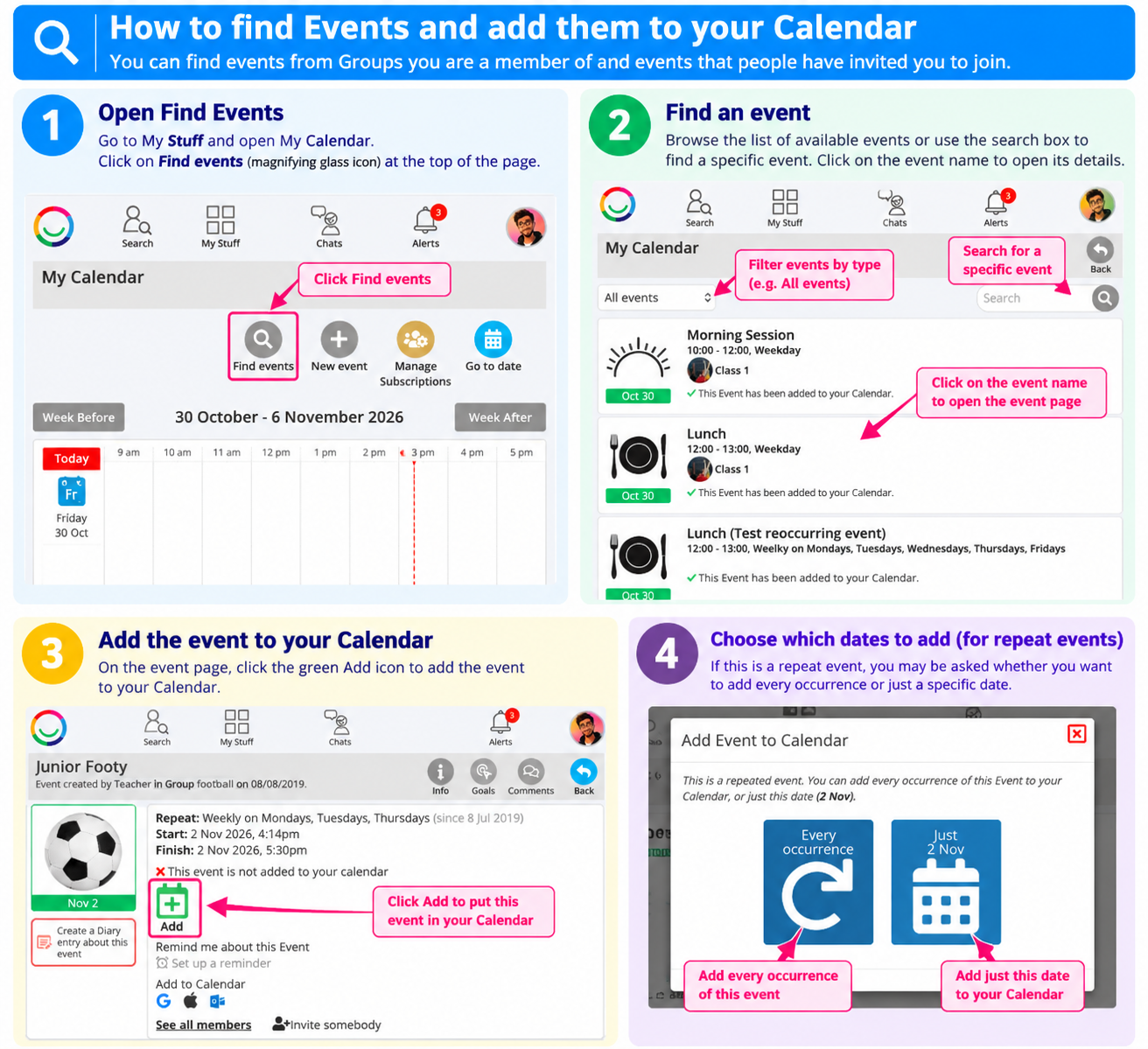
1. Find Events
Go to My Stuff → My Calendar.
Click Find Events (magnifying glass icon) at the top of the Calendar.
Browse the available events or use the search box to find a particular event.
2. Open an Event
Click on the Event name to open its details.
You can see information about the event, including its date, time, description and who is attending.
3. Add the Event to Your Calendar
On the Event page, click the green Add calendar icon.
The event will now appear in My Calendar.
You can also indicate whether you are attending by selecting Yes, Maybe or No.
Repeat Events: If an event happens regularly, you may be asked whether you want to add just one occurrence, several occurrences or the whole series.
4. Removing an Event
If you no longer want an event to appear in your Calendar:
Open the event from your Calendar.
Click the red Remove calendar icon.
The event will be removed from your Calendar.
Tip: You can also use Manage Subscriptions on your Calendar page to choose which Group events appear automatically in your Calendar.
Was this article helpful?
That’s Great!
Thank you for your feedback
Sorry! We couldn't be helpful
Thank you for your feedback
Feedback sent
We appreciate your effort and will try to fix the article