You can add comments to existing Diary Log entries in Multi Me. This is useful for sharing additional information, asking questions or responding to something someone else has recorded.
You can comment on your own Diary Logs or someone else's, provided you have the appropriate access permissions.
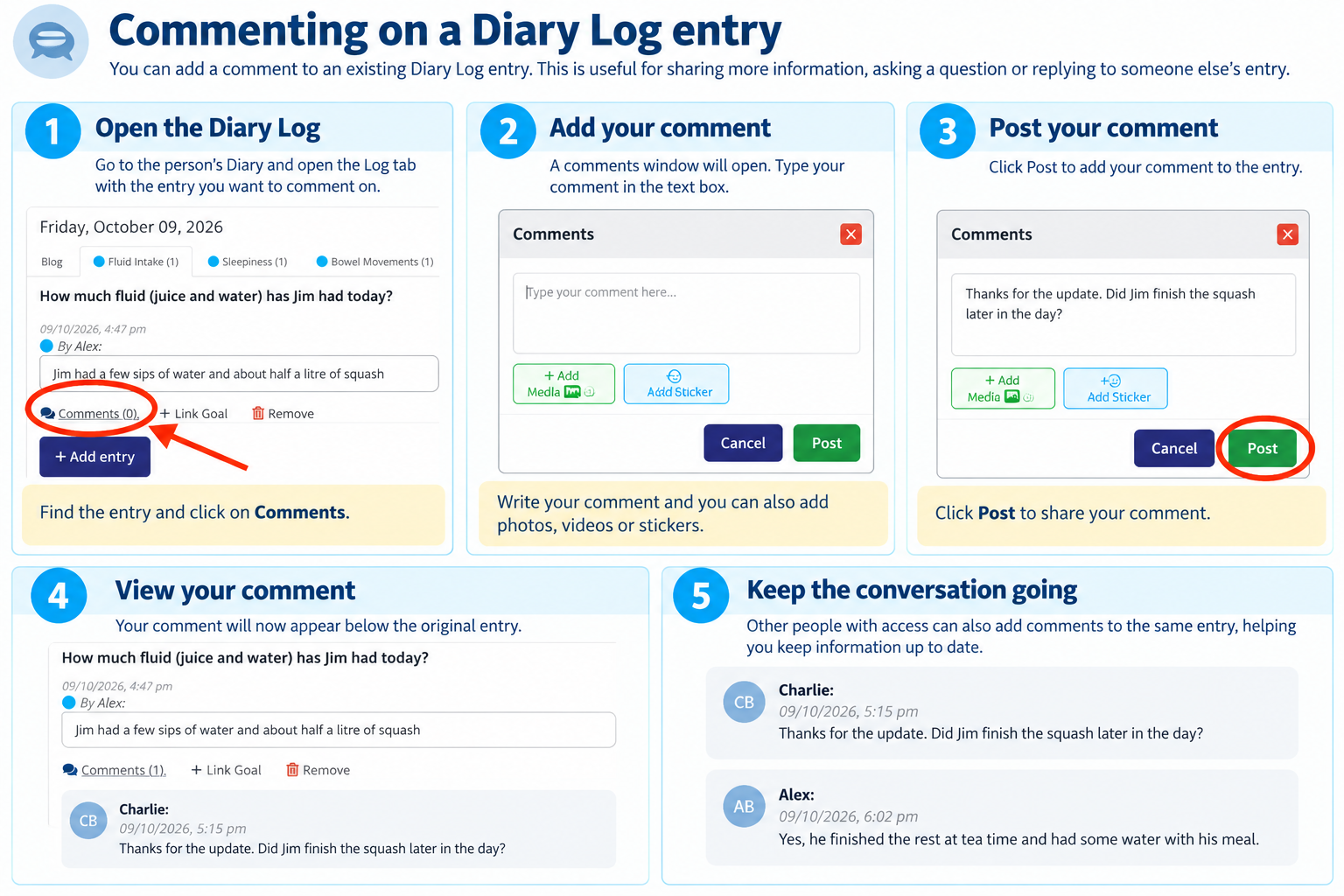
How to add a comment
Open the person's Diary.
Select the Log tab containing the entry you want to comment on.
Find the entry and click Comments underneath it.
Type your comment in the box provided. You can also add photos, videos or stickers.
Click Post to save your comment.
Your comment will appear alongside the original Log entry.
Can other people reply?
Yes. Other people with the appropriate access permissions can view and respond to comments, helping everyone involved stay informed.
For example, a support worker might record how much someone has had to drink during the day. Another member of the team could add a comment asking for an update or providing further information.
Important to know
Diary Logs are often used to record important care and support information.
Comments are retained as part of the Diary's audit record, so make sure the information you add is accurate and appropriate.
Need help?
If you cannot see the Comments option or cannot add a comment, check that you have the appropriate access permissions or ask the person managing the Diary for help.
Was this article helpful?
That’s Great!
Thank you for your feedback
Sorry! We couldn't be helpful
Thank you for your feedback
Feedback sent
We appreciate your effort and will try to fix the article