You can update a Wiki Section at any time, including changing its name, picture or audio caption.
How to edit a Wiki Section
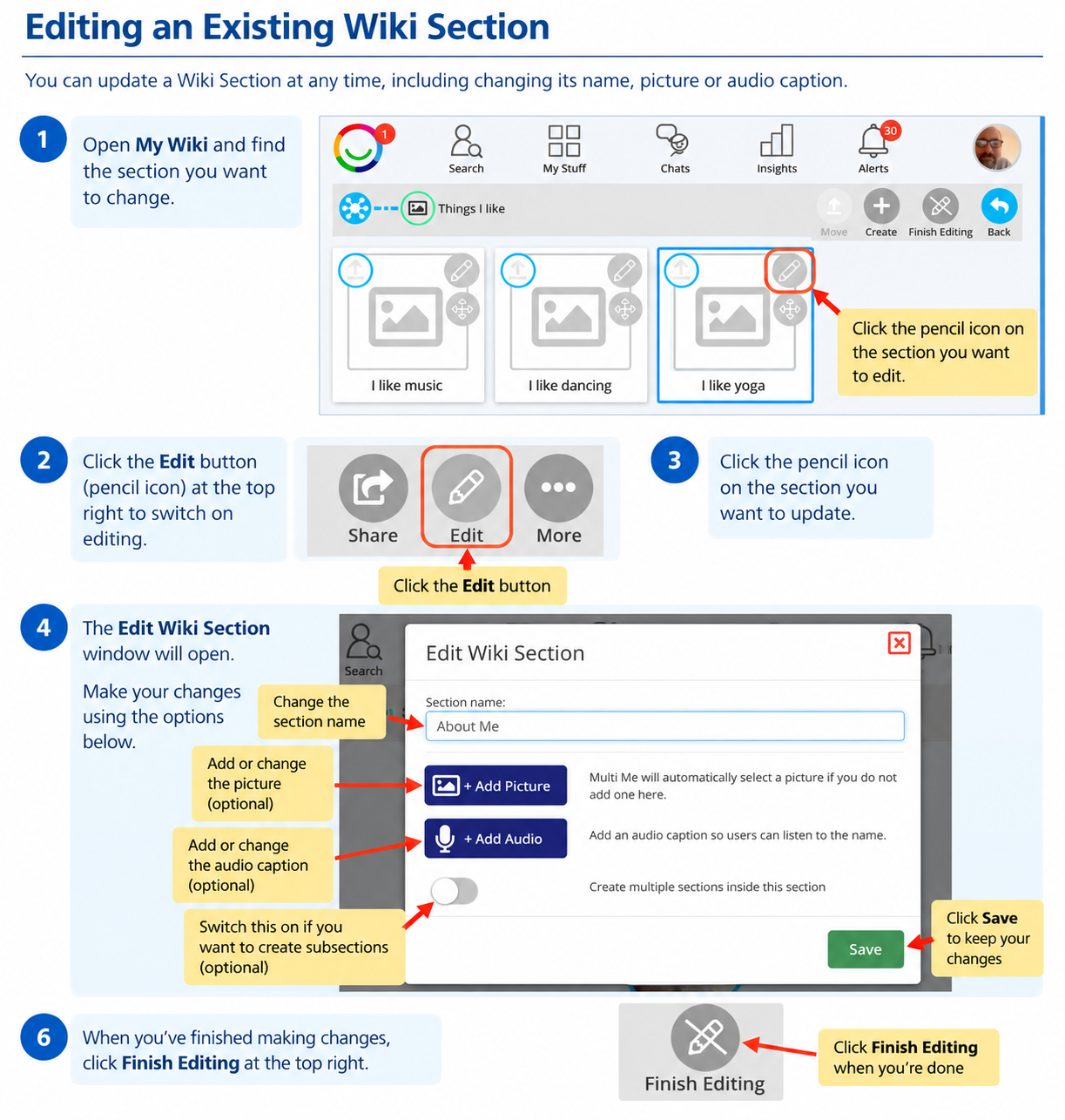
Open My Wiki and find the section you want to change.
Click Edit (pencil icon) at the top right to switch on editing.
Click the pencil icon on the Wiki Section you want to update.
The Edit Wiki Section window will open.
Make your changes and click Save.
Click Finish Editing when you're done.
What can I change?
Section name – change the title of your section.
Picture – add or change the picture representing your section.
Audio caption – add an audio recording so people can listen to the section name.
Subsections – use the switch to organise content into smaller sections.
The same process works for sections on your main Wiki menu and sections within other sections.
Need help?
Ask your Buddy or someone supporting you if you need help updating your Wiki.
Was this article helpful?
That’s Great!
Thank you for your feedback
Sorry! We couldn't be helpful
Thank you for your feedback
Feedback sent
We appreciate your effort and will try to fix the article