You can move one or more Wiki Pages to a different Section of your Wiki. You can also move Pages to another Wiki if you have access to one.
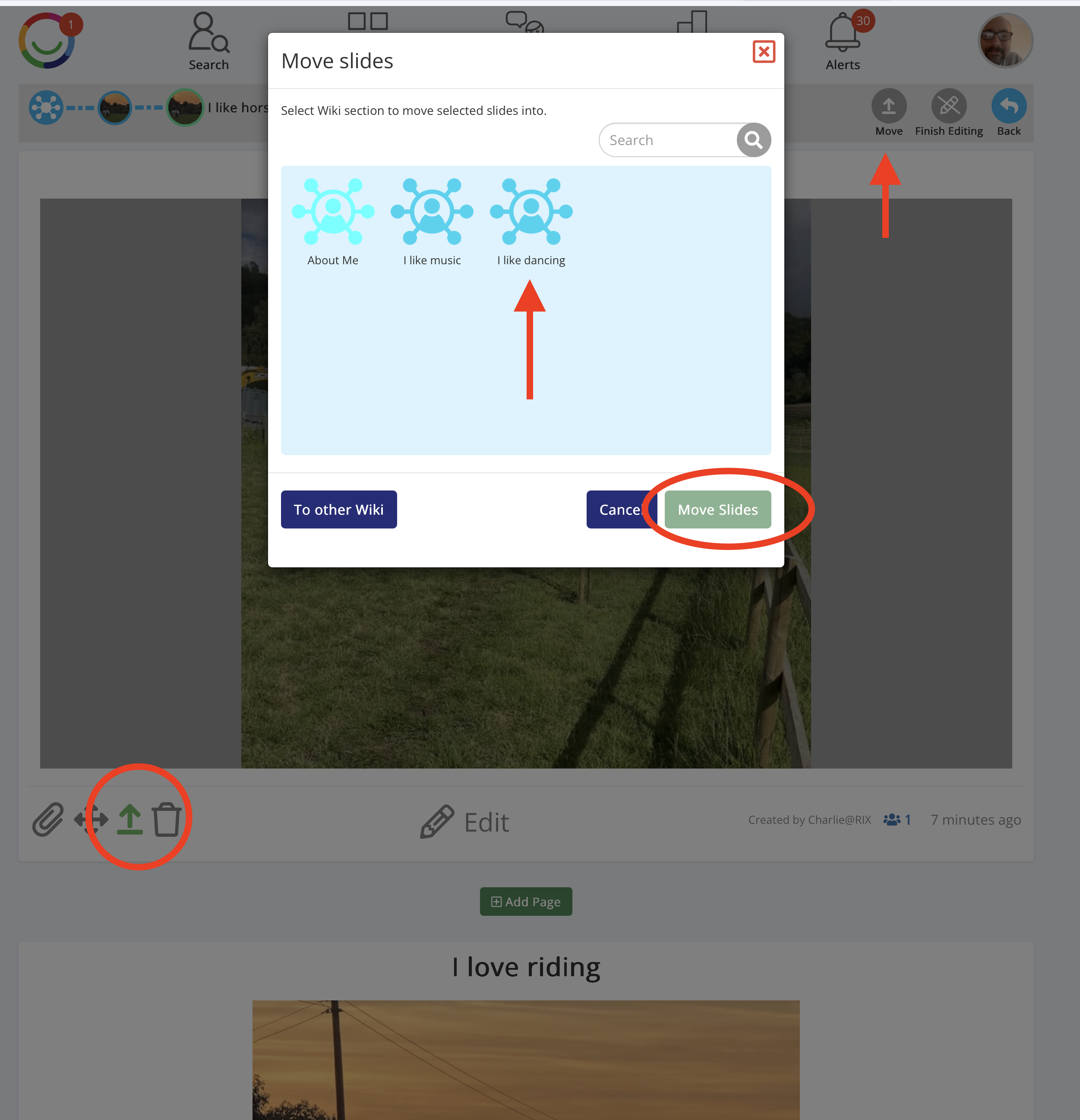
Steps to move Wiki Pages
Open your Wiki and go to the Section containing the Pages you want to move.
Click Edit to switch on editing mode.
Find the Move icon (upward arrow) at the bottom left of the Page, next to the four-way drag-and-drop icon.
Click the Move icon to select that Page. You can select several Pages by clicking the Move icon on each one.
Click Move at the top right of the screen.
In the Move Pages window, choose the Section you want to move your selected Pages into. You can use the search box to find a Section.
Click Move Pages to complete the move.
Click Finish Editing when you're done.
Moving Pages to another Wiki
In the Move window, select To other Wiki to choose a different Wiki as the destination.
Tip: Moving Pages keeps their content together, including pictures, videos and descriptions. This is useful when reorganising your Wiki without deleting and recreating Pages.
Was this article helpful?
That’s Great!
Thank you for your feedback
Sorry! We couldn't be helpful
Thank you for your feedback
Feedback sent
We appreciate your effort and will try to fix the article