Multi Me lets you link Diary Blog posts directly to your Goals and Steps.
This is a great way to show progress towards your Goals using photos, videos, text and other media from your everyday activities.
For example, if you're working towards becoming more independent, you could link a Diary post showing you preparing a meal, travelling independently or learning a new skill.
A note about Goals and Steps
Multi Me uses Goals and Steps as the default names. However, your Portal Administrator may have customised these to suit your organisation, for example Outcomes and Targets.
The features work in the same way, even if the names are different.
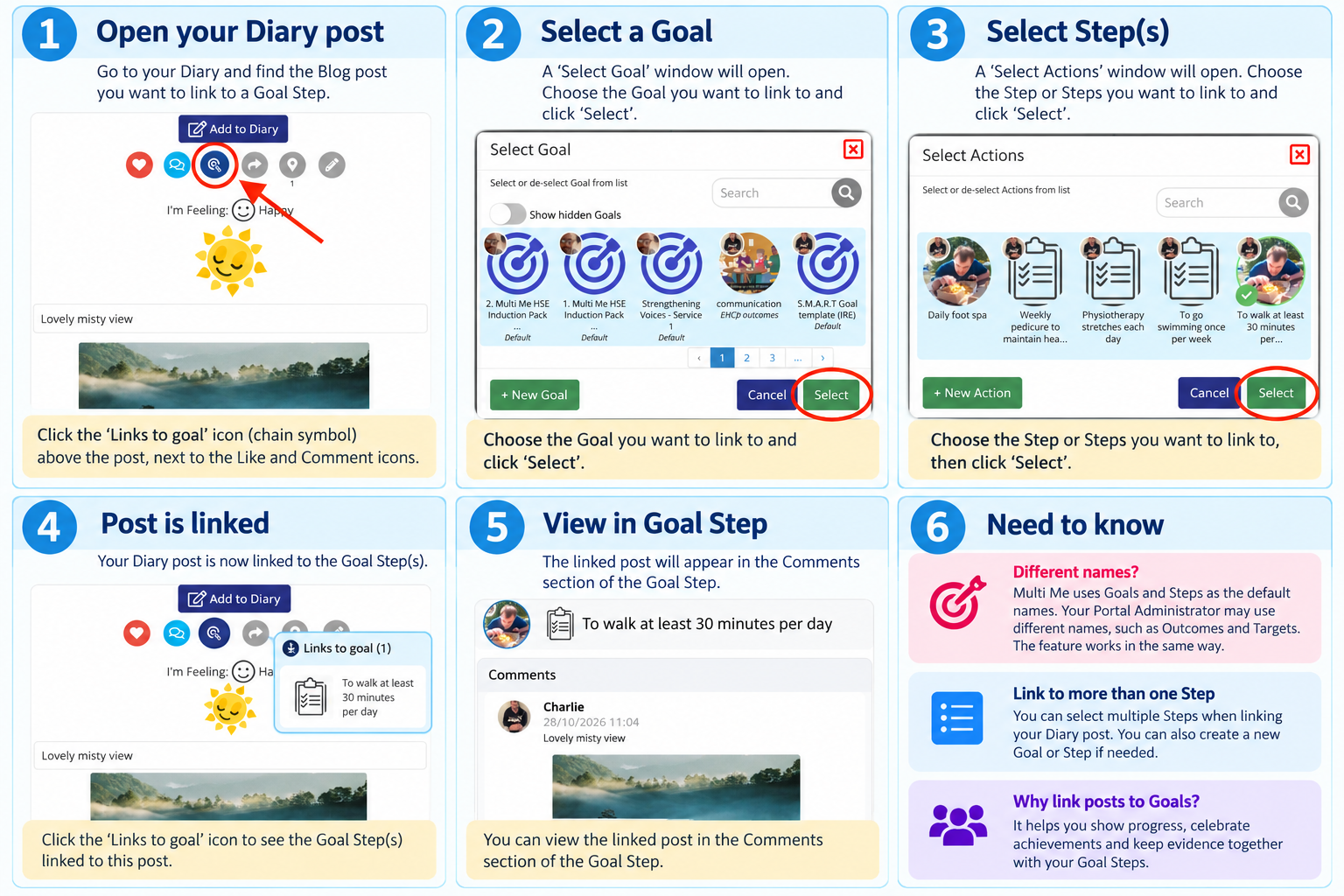
How to link a Diary post to a Goal Step
Open your Diary and find the Blog post you want to link.
Click the three dots (Show More Options) above the post, next to the Like and Comment icons.
Select the Links to Goal icon.
In the Linked Goals window, click + Add.
Choose the Goal you want to link to and click Select.
Choose the relevant Step or Steps within that Goal and click Select.
Your Diary post is now linked to your Goal Step.
Where will the linked post appear?
The linked Diary post will appear in the Step Comments section of the relevant Goal Step.
This helps you and the people supporting you see the activities, experiences and achievements that contribute towards your Goals.
Can I link a post to more than one Step?
Yes. You can select multiple Steps when linking your Diary post.
You can also create a new Goal or Step during the linking process if needed.
Why link Diary posts to Goals?
Linking Diary posts to Goals helps you:
Show your progress using photos, videos and real-life experiences.
Celebrate achievements and important milestones.
Keep evidence together alongside the Steps you're working towards.
Involve your support team in recognising your progress.
Need help?
If you can't find the Goal or Step you want to link to, ask your Buddy or someone supporting you for help.
Was this article helpful?
That’s Great!
Thank you for your feedback
Sorry! We couldn't be helpful
Thank you for your feedback
Feedback sent
We appreciate your effort and will try to fix the article