A Wiki Admin has full administrative access to a Wiki, including the ability to edit content and manage who can view or edit it.
How to make someone a Wiki Admin
Open the Wiki you manage.
From the Wiki Main Menu, click More (…) → Access.
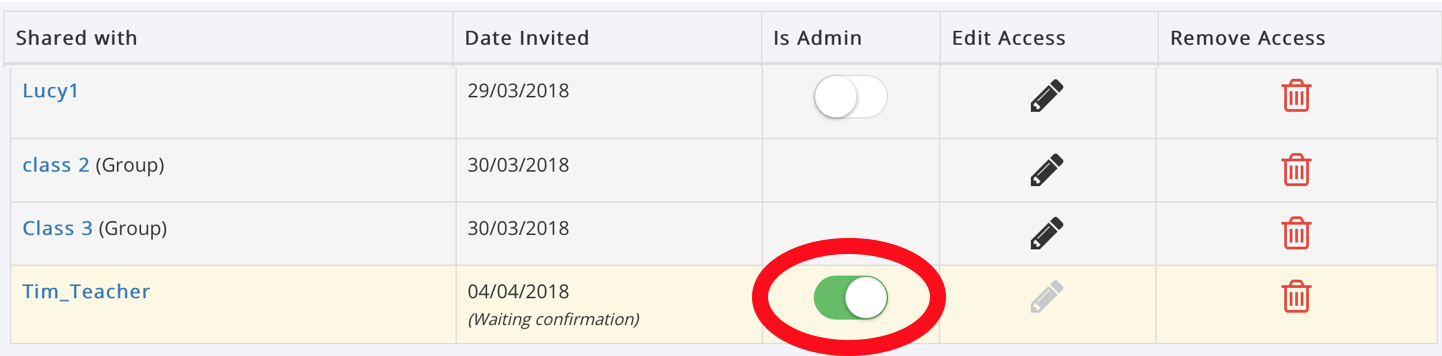
In the Manage User Access page, find the person under Wiki Members.
Turn on the Is Admin switch next to their name.
The switch will turn green, confirming they have Wiki Admin access.
To remove their Wiki Admin privileges, switch Is Admin off again.
Important
Buddies automatically have Admin access to the Supported User's Wiki.
You can also manage Wiki permissions through the Supported User's Circle → Manage Access.
Staff may have Wiki Admin permissions through their organisation's Role-Based Access (RBA) settings. These permissions must be managed by a Portal Admin.
Only give Admin access to people who need to manage the Wiki.
Was this article helpful?
That’s Great!
Thank you for your feedback
Sorry! We couldn't be helpful
Thank you for your feedback
Feedback sent
We appreciate your effort and will try to fix the article