As a Wiki Admin or Buddy, you can manage who has access to a Supported User's Wiki and check who can see individual Sections and Pages.
You can view access at three levels:
Whole Wiki – See who has access to the Wiki overall.
Wiki Section – See who has access to a particular Section.
Wiki Page – See who has access to an individual Page.
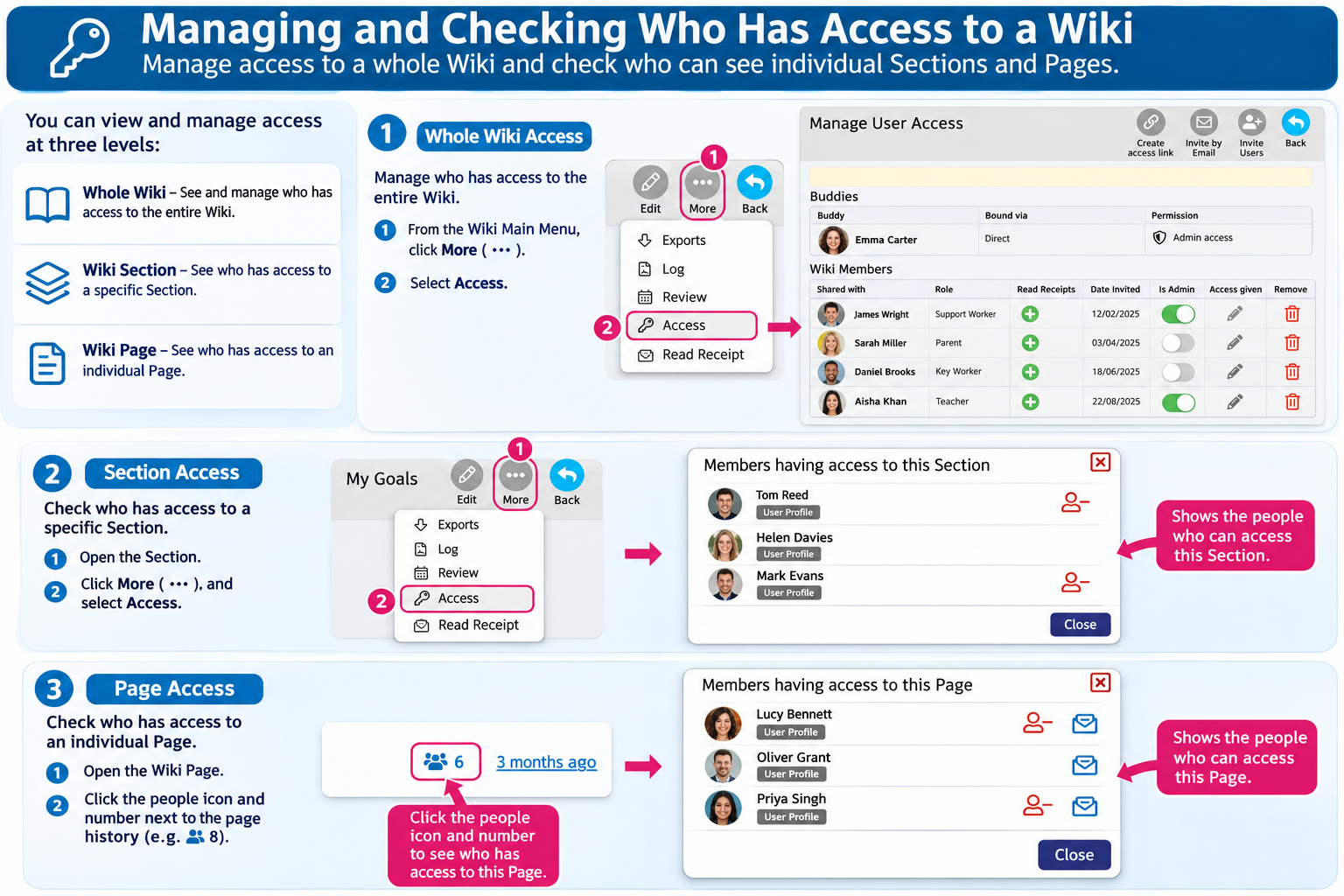
1. Managing Access to the Whole Wiki
Open the Supported User's Wiki.
From the Wiki Main Menu, click More (three dots).
Select Access.
The Manage User Access page will open.
Here you can see:
Buddies – People with Buddy access to the Supported User's Wiki.
Wiki Members – People who have been given access to the Wiki.
Admin access – Who has permission to administer the Wiki.
Access given – Where you can view or change individual access permissions.
Read Receipts – Options for sending Read Receipt requests.
Remove Access – Where permitted, remove someone's access to the Wiki.
You can also use the buttons at the top to Invite Users, Invite by Email or Create an Access Link.
2. Checking Who Has Access to a Wiki Section
You can check who has access to a particular Section of the Wiki.
Open the Wiki Section you want to check.
Open the Section's access information.
A window titled Members having access to this Section will appear.
You will see a list of people who can access that Section.
This helps you check who can view information within a particular part of the Wiki.
3. Checking Who Has Access to a Wiki Page
You can also see who has access to an individual Wiki Page.
Open the Wiki Page.
At the bottom of the Page, click the people icon and number next to the Page's history date.
A window titled Members having access to this Page will open.
You will see the people who have access to that Page.
The number beside the people icon shows how many people have access.
4. Understanding Wiki Permissions
Access may be provided through:
Buddy access – Buddies have Admin access to the Supported User's Wiki.
Role-Based Access (RBA) – Permissions assigned through the organisation's Portal.
Wiki sharing – Access granted directly to individuals through the Wiki or Circle.
Important: Permissions assigned through organisational Role-Based Access cannot be removed using the Wiki's Manage Access page. These must be managed by an authorised Portal Administrator.
5. Keeping Wiki Information Private
Before sharing Wiki information, consider whether the person needs access to the whole Wiki or only particular Sections and Pages.
Only share personal information with people who need it, and involve the Supported User in decisions about sharing wherever possible.
Was this article helpful?
That’s Great!
Thank you for your feedback
Sorry! We couldn't be helpful
Thank you for your feedback
Feedback sent
We appreciate your effort and will try to fix the article