As a Wiki Admin or Buddy, you can invite people from the Wiki Owner's Circle to view or edit their Wiki.
You can choose which Wiki Sections and Pages each person can access, helping you share information with the right people.
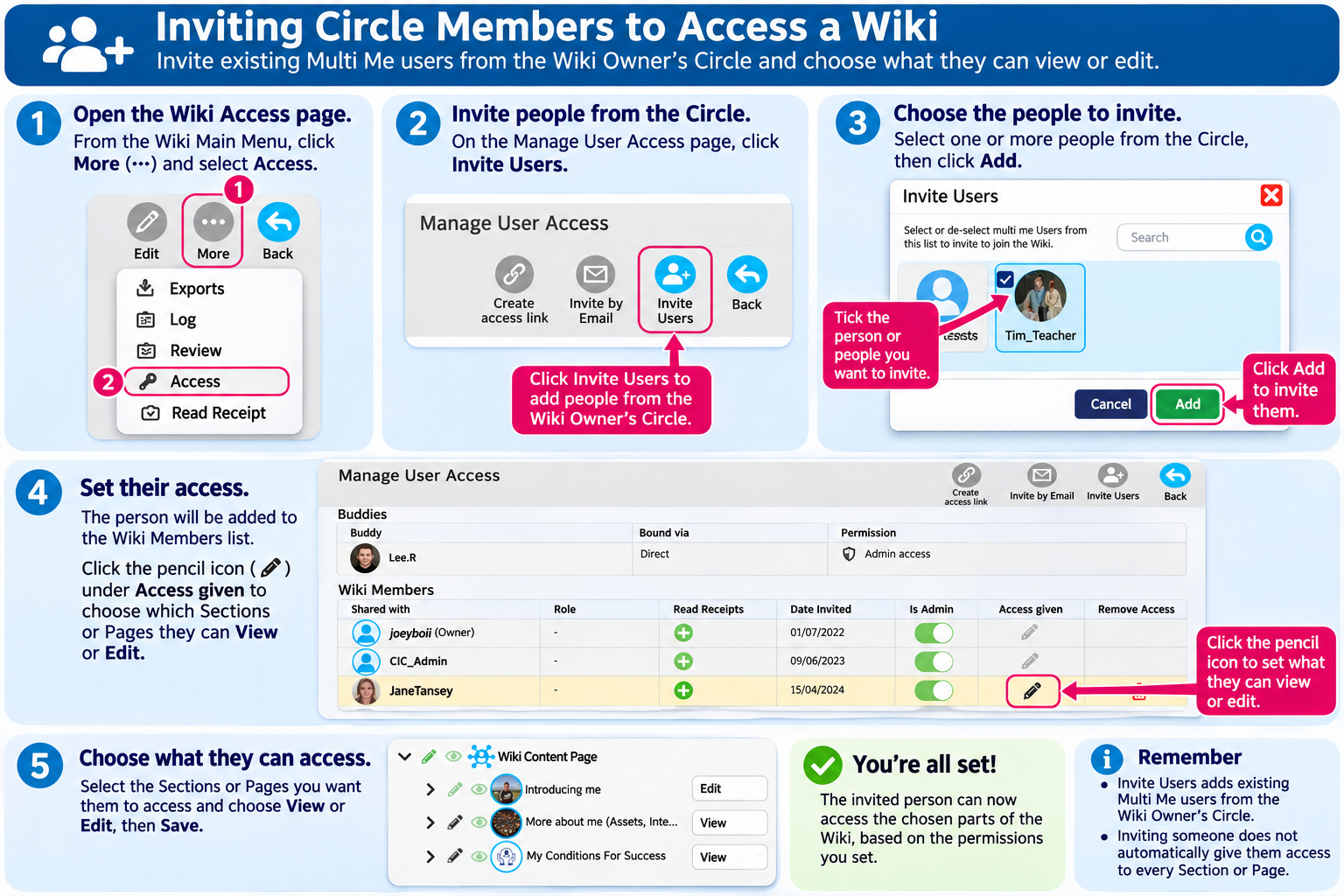
How to Invite Circle Members
Open the Supported User's Wiki Main Menu.
Click More (three dots).
Select Access.
The Manage User Access page will open.
Click Invite Users at the top of the page.
Select one or more people from the Wiki Owner's Circle. You can use the search box to find someone.
Click Add and follow the confirmation prompts.
The invited people will now appear in the Wiki Members list.
Choosing What People Can View or Edit
After inviting someone, you can choose which parts of the Wiki they can access.
Find the person in the Wiki Members list.
Click the pencil icon under Access given.
A list of Wiki Sections and Pages will appear.
Use the eye icon to give viewing access.
Use the pencil icon to give editing access.
Expand Sections using the arrow icons to set permissions for individual Pages.
Save your changes.
You can give someone access to the entire Wiki or just the Sections and Pages they need.
Giving Someone Wiki Admin Access
If someone needs to help manage the whole Wiki, you can give them Wiki Admin access.
Find the person in the Wiki Members list.
Switch on Is Admin.
Wiki Admins have full access to manage the Wiki and its content.
Only give Admin access to people who need this level of responsibility.
Managing Access Through My Circle
You can also manage Wiki permissions for existing Circle members through the Supported User's My Circle → Manage Access page.
This is useful when you want to manage someone's access to several Multi Me features, including their Wiki, Diary, Goals and Media.
Important Things to Remember
Inviting someone does not automatically give them access to every part of the Wiki. You may need to set their viewing or editing permissions.
Buddies automatically have Admin access to the Supported User's Wiki.
Some staff may already have Wiki access through organisational Role-Based Access (RBA).
Permissions assigned through RBA cannot be removed using Wiki Manage Access. These must be managed by an authorised Portal Administrator.
Always consider the Supported User's wishes and privacy when sharing information.
Was this article helpful?
That’s Great!
Thank you for your feedback
Sorry! We couldn't be helpful
Thank you for your feedback
Feedback sent
We appreciate your effort and will try to fix the article