You can choose which email notifications you receive from Multi Me.
This helps you stay informed without receiving emails you don't need.
How to change your email notifications
Sign in to your Multi Me account.
Select your profile picture at the top right of the screen.
Choose Settings.
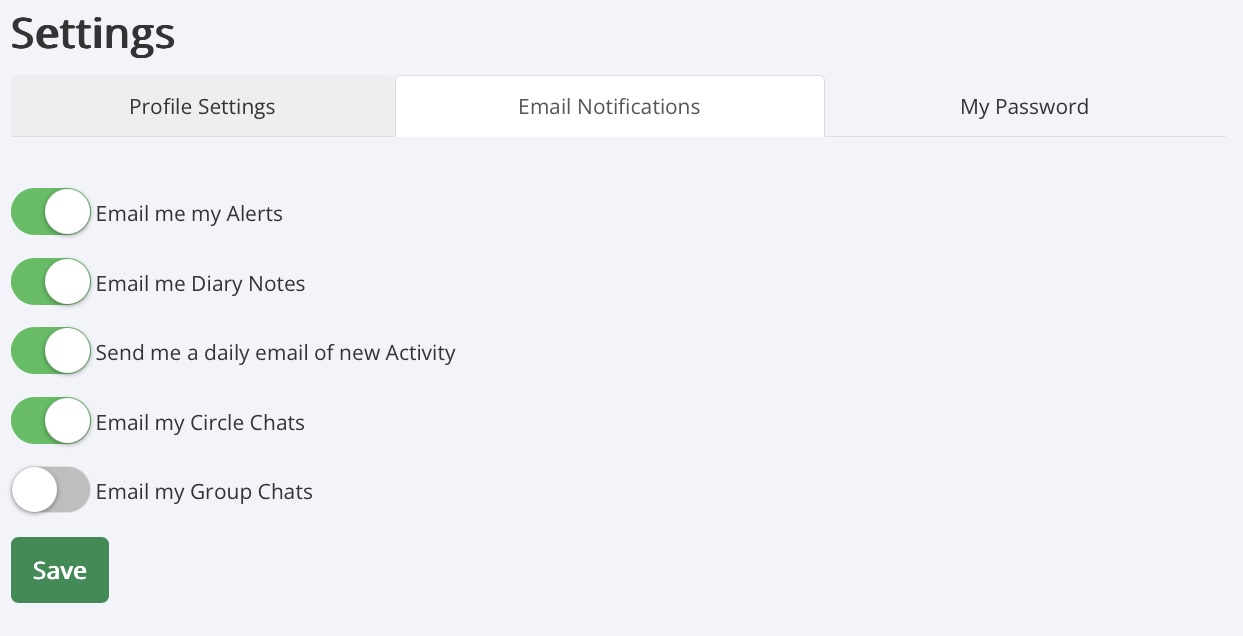
Select the Email Notifications tab.
Turn the email notifications on or off to suit your preferences.
Select Save to keep your changes.
Which emails can I choose?
You can choose whether to receive emails about:
Alerts – Notifications about activity on Multi Me.
Diary Notes – Notifications about Diary entries.
Daily Activity – A daily email about new activity.
Circle Chats – Messages from people in your Circle.
Group Chats – Messages in your Groups.
A green switch means the email notification is turned on.
A grey switch means it is turned off.
Need some help?
Ask your Buddy, support worker or someone you trust to help you change your email settings.
Was this article helpful?
That’s Great!
Thank you for your feedback
Sorry! We couldn't be helpful
Thank you for your feedback
Feedback sent
We appreciate your effort and will try to fix the article