If you're an authorised Buddy, you can switch off chat and commenting features for a Supported User through their permissions settings.
This can be useful when you need to manage how someone communicates with others on Multi Me.
How to switch off messaging and comments
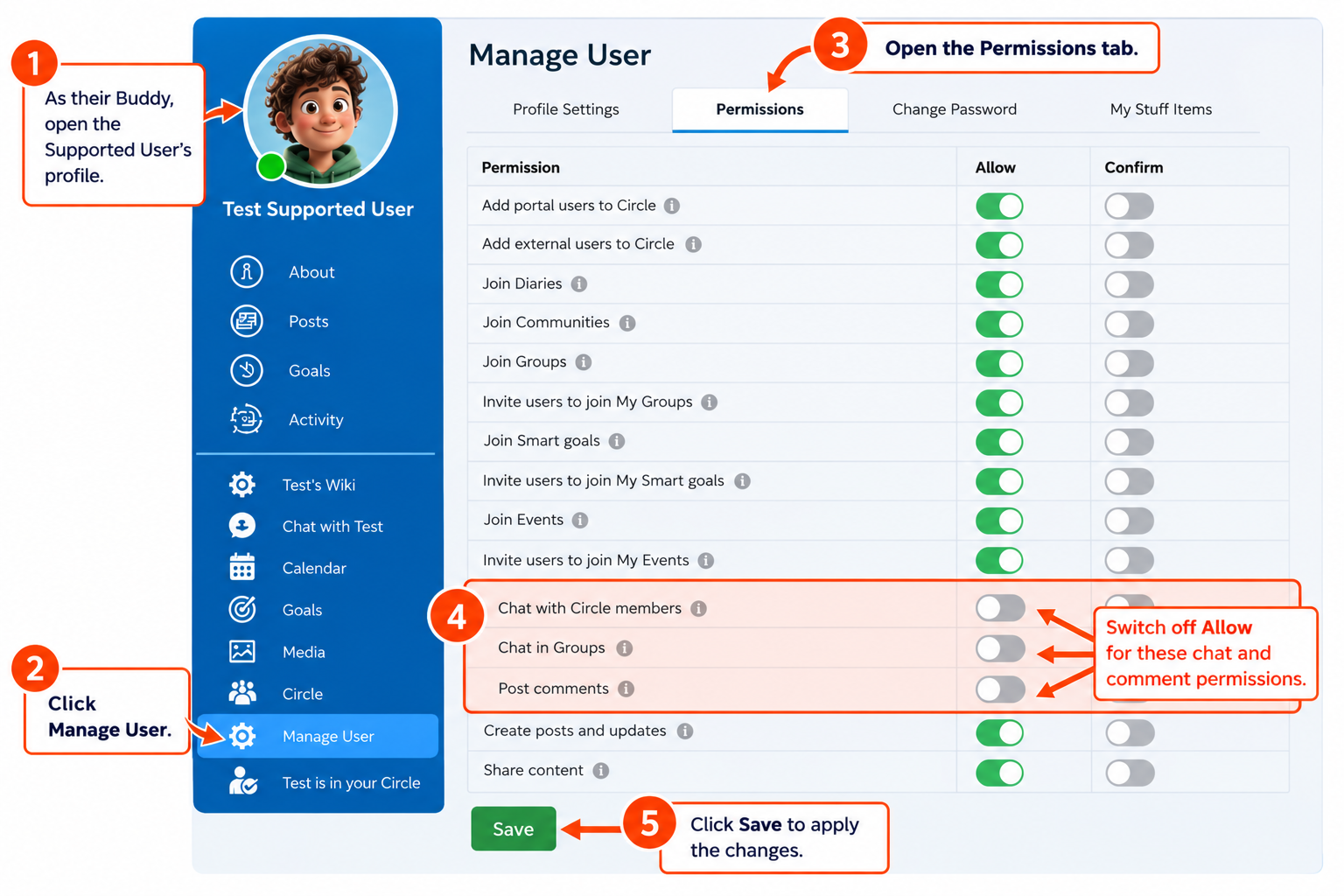
Sign in to Multi Me as the Supported User's Buddy.
Go to the Supported User's Profile page.
Select Manage User.
Open the Permissions tab.
Find the chat and commenting permissions and switch off Allow for:
Chat with Circle members
Chat in Groups
Post comments
Click Save to apply the changes.
What happens next?
The Supported User will no longer be able to use the chat and commenting features you've disabled.
You can turn these permissions back on later by returning to the same settings.
Need help?
If you can't find these settings or aren't sure which permissions to change, contact your Portal Administrator or the Multi Me support team.
Was this article helpful?
That’s Great!
Thank you for your feedback
Sorry! We couldn't be helpful
Thank you for your feedback
Feedback sent
We appreciate your effort and will try to fix the article