You can hide Goals that are no longer active to keep your Goals page organised.
Goals are automatically hidden when they are completed. Hidden Goals are not deleted and can still be viewed or made visible again.
How to hide a Goal
Go to your Goals page, or open the Goals of someone you support.
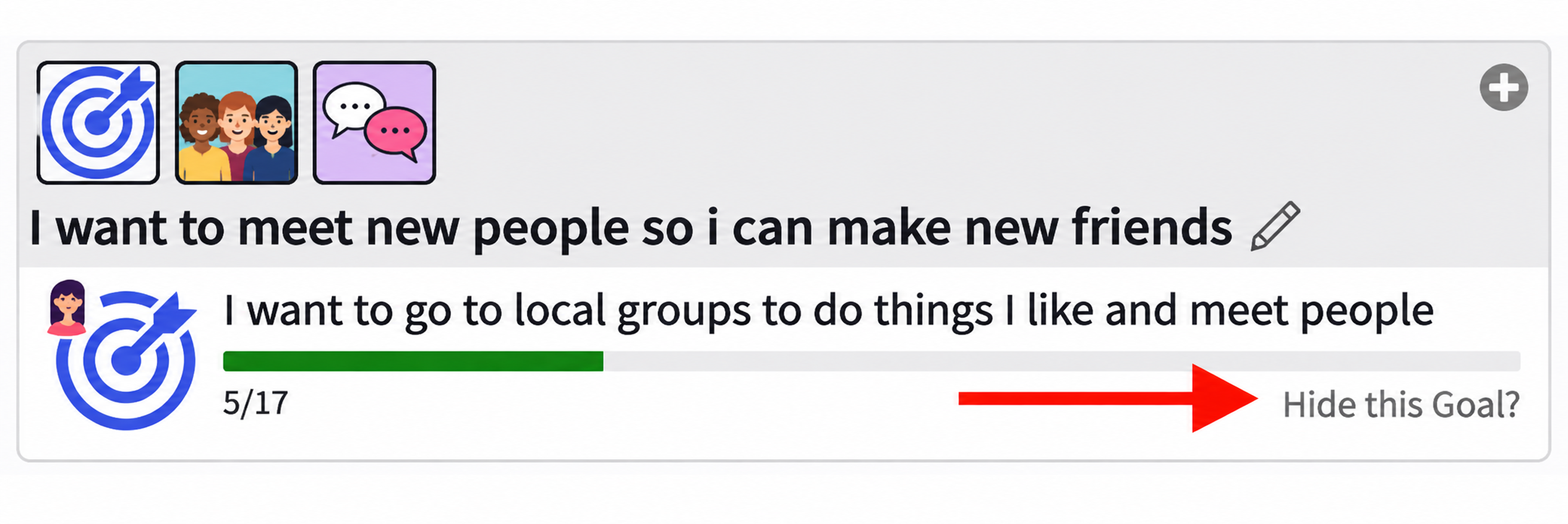
Find the Goal you want to hide.
Click Hide this Goal? beneath the Goal's progress bar.
Confirm your choice if prompted.
The Goal will disappear from your normal Goals view.
How to view hidden Goals
On the Goals page, click the Filter icon.
Switch on Show Hidden Goals.
Click Apply.
Your hidden Goals will now appear alongside your other Goals.
How to unhide a Goal
Use the Filter to show hidden Goals.
Find the Goal you want to make visible again.
Click Unhide this Goal beneath its progress bar.
Confirm your choice if prompted.
The Goal will appear in your normal Goals view again.
Remember: Hiding a Goal does not delete it or remove its Steps, progress or evidence.
Was this article helpful?
That’s Great!
Thank you for your feedback
Sorry! We couldn't be helpful
Thank you for your feedback
Feedback sent
We appreciate your effort and will try to fix the article