Multi Me lets you see which phones, tablets and computers are signed in to your account.
It's a good idea to check this list occasionally to help keep your account safe.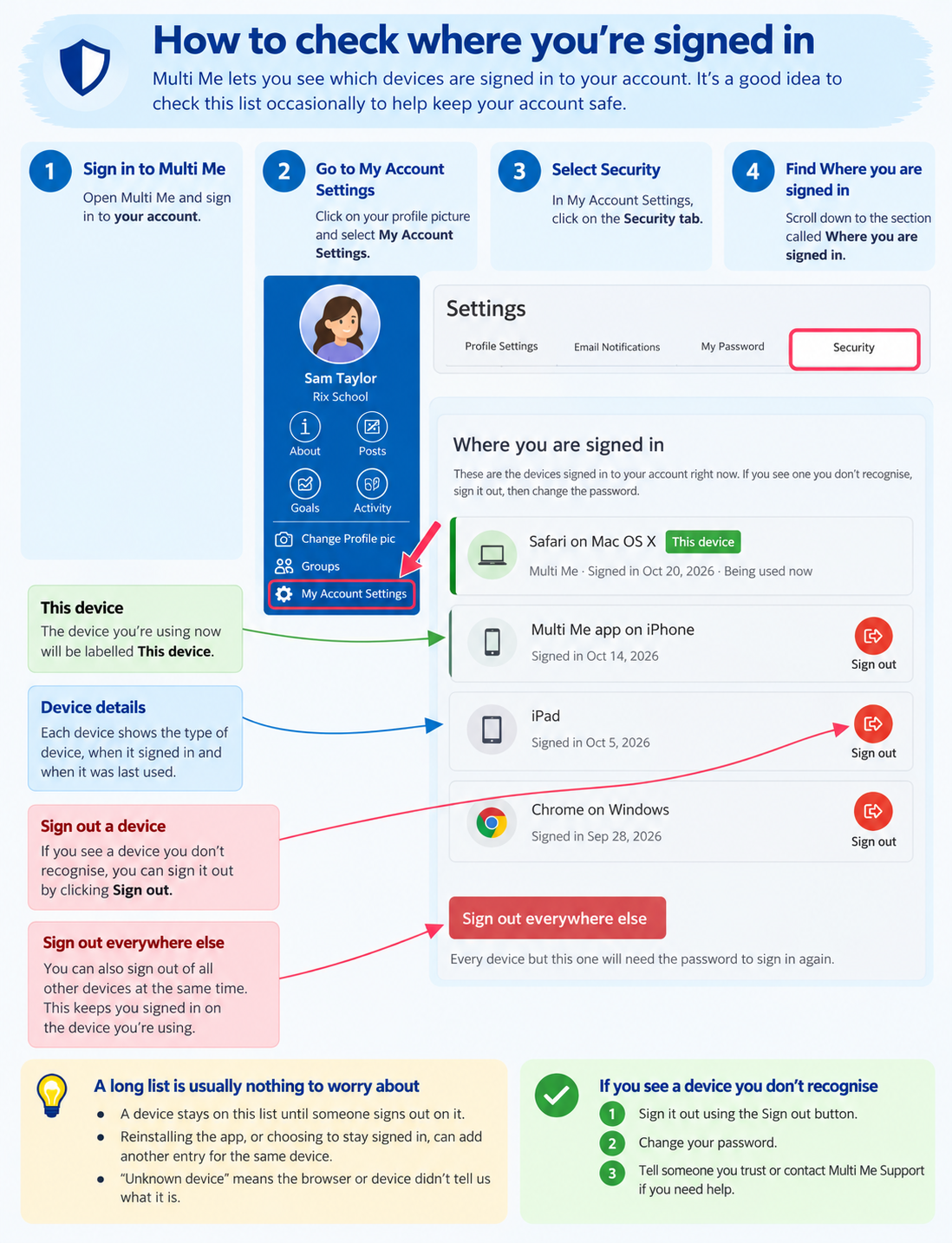
How to see your signed-in devices
Sign in to Multi Me.
Select My Account Settings.
Select the Security tab.
Scroll down to Where you are signed in.
You'll see a list of devices that have signed in to your account.
The device you're using now will be labelled This device.
What if I see a device I don't recognise?
If you see a device you don't recognise, you can sign it out.
If you think someone else may have accessed your account, change your password too.
A long list is usually nothing to worry about
Devices can stay on the list until you sign out.
Reinstalling Multi Me or choosing to stay signed in can add another entry for the same device.
Unknown device means Multi Me couldn't identify the device.
To tidy up your list, you can use Sign out everywhere else at the bottom of the page.
This signs out your other devices but keeps you signed in on the device you're using.
Need help?
If you're worried about an unfamiliar device, ask someone you trust or contact your portal administrator.
You can also contact Multi Me Support through this Helpdesk.
Was this article helpful?
That’s Great!
Thank you for your feedback
Sorry! We couldn't be helpful
Thank you for your feedback
Feedback sent
We appreciate your effort and will try to fix the article