As a Wiki Admin or Buddy, you can invite someone to view a Supported User's Wiki using a secure email access link.
This is useful for sharing information with family members, professionals or other supporters who do not have a Multi Me account.
Email access links are password protected, have an expiry date, and allow viewing access only to the Wiki Sections and Pages you choose.
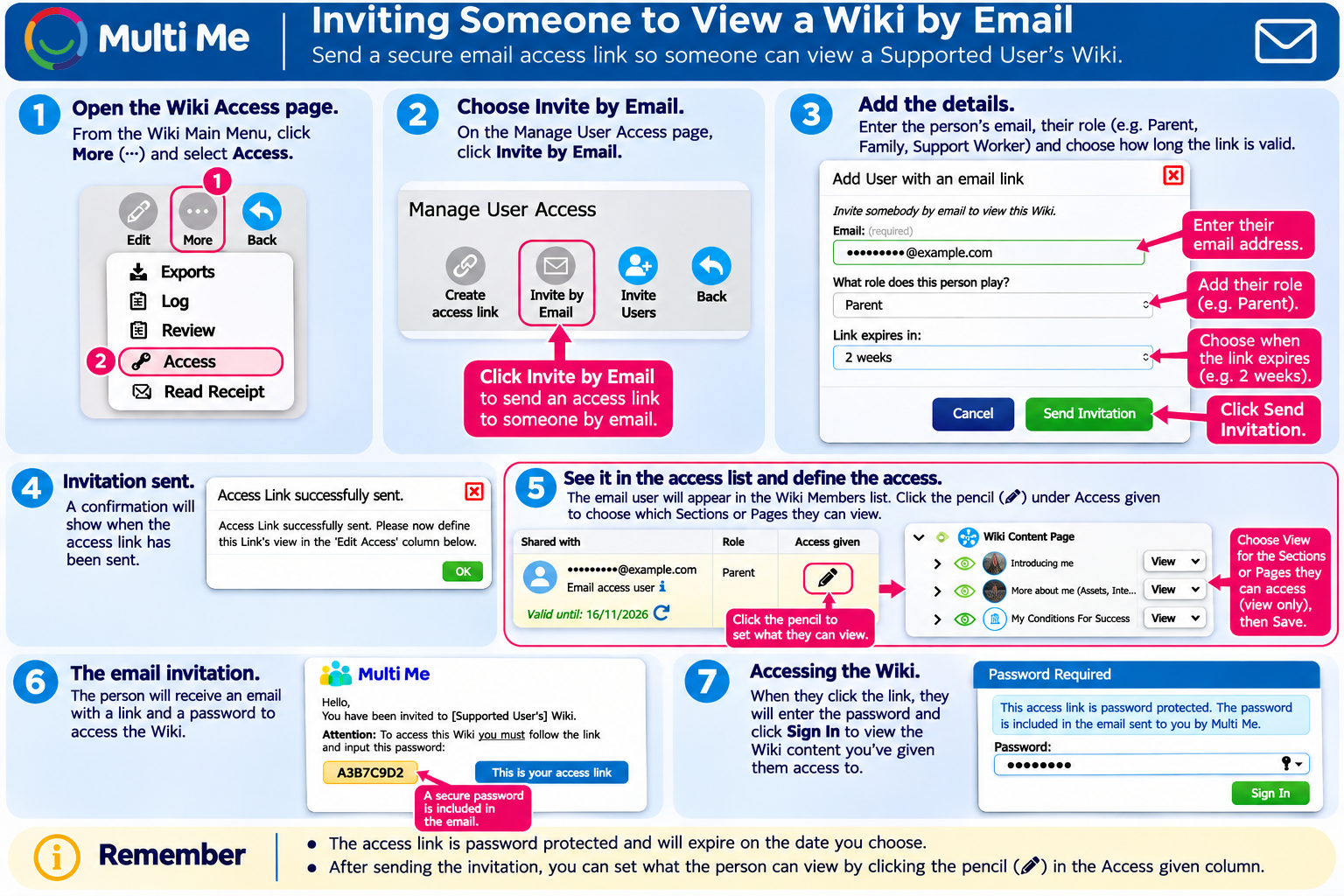
1. Open the Wiki Access Page
Open the Supported User's Wiki Main Menu.
Click More (three dots).
Select Access.
The Manage User Access page will open.
2. Invite Someone by Email
Click Invite by Email at the top of the page.
Enter the person's email address.
Enter their role or relationship to the Supported User (for example, Parent, Family Member or Support Worker).
Choose how long the access link should remain valid using Link expires in.
Click Send Invitation.
Multi Me will send an email containing a secure access link and password.
3. Choose What They Can View
After sending the invitation, you must choose which parts of the Wiki the person can access.
Find the email address in the Wiki Members list.
Click the pencil icon under Access given.
The Wiki's Sections and Pages will appear.
Use the eye icons to give viewing access to the Sections or Pages you want to share.
Expand Sections using the arrow icons to select individual Pages.
Save your changes.
Important: Email access users have viewing access only. They cannot edit Wiki content.
Until you set their viewing permissions, the invitation will show No access given.
4. How the Person Opens the Wiki
The invited person will receive an email from Multi Me containing:
A link to the Supported User's Wiki.
A password to access the shared information.
To open the Wiki, they simply:
Click the access link in the email.
Enter the password provided.
Click Sign In.
They can then view the Wiki Sections and Pages you have shared with them.
They do not need to register for a Multi Me account.
5. Managing Email Access
From the Manage User Access page, you can:
Check when the access link expires.
Change which Sections or Pages the person can view.
Copy the access link or password using the clipboard icons.
Renew or refresh the access link using the circular arrow icon.
Remove access using the red bin icon.
Remember
Email access links are password protected and expire after the selected period.
You must set the person's viewing permissions after sending the invitation.
Email access users can view but not edit Wiki content.
Only share personal information with people who are authorised to see it.
Involve the Supported User in decisions about sharing their information wherever possible.
Was this article helpful?
That’s Great!
Thank you for your feedback
Sorry! We couldn't be helpful
Thank you for your feedback
Feedback sent
We appreciate your effort and will try to fix the article