Diary Admins can manage who can view or edit a person's Diary, including the main multimedia Blog and individual Diary Logs.
Access can be managed directly from the Diary or through the person's Circle.
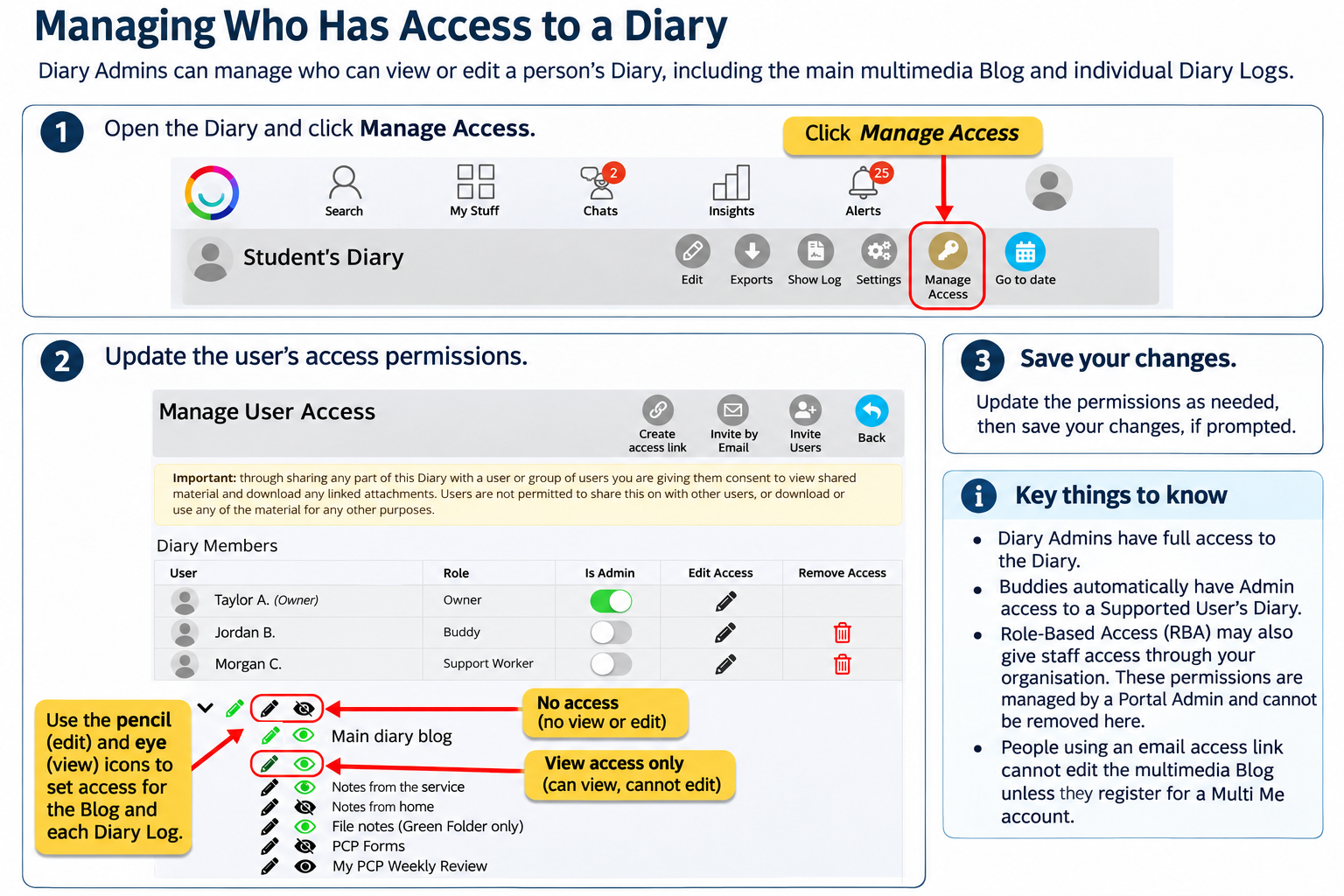
Managing Access from the Diary
Open the person's Diary.
Click More (three dots) → Manage Access.
Find the person whose access you want to change.
Click the pencil icon in the Access column.
Use the eye icons to give or remove viewing access and the pencil icons to give or remove editing access for the Blog and individual Diary Logs.
Save your changes, if prompted.
Important Information
Diary Admins have full access to the Diary.
Buddies automatically have Admin access to a Supported User's Diary.
Role-Based Access (RBA) may also give staff access through their organisation. These permissions are managed by a Portal Admin and cannot be removed through the Diary's Manage Access page.
People accessing the Diary through an email access link cannot edit the multimedia Blog unless they register for a Multi Me account.
You can also manage Diary sharing through the person's My Circle → Manage Access settings.
Was this article helpful?
That’s Great!
Thank you for your feedback
Sorry! We couldn't be helpful
Thank you for your feedback
Feedback sent
We appreciate your effort and will try to fix the article