You can export data collected in Forms to a CSV file which can be viewed and worked with in applications such as Microsoft Excel, PowerBI and Apple Numbers etc... The CSV file will show rows of 'Form owners' and columns showing Form questions and data added. The rows will be organised into chronological order. Note: media attachments will not be shown in the CSV.
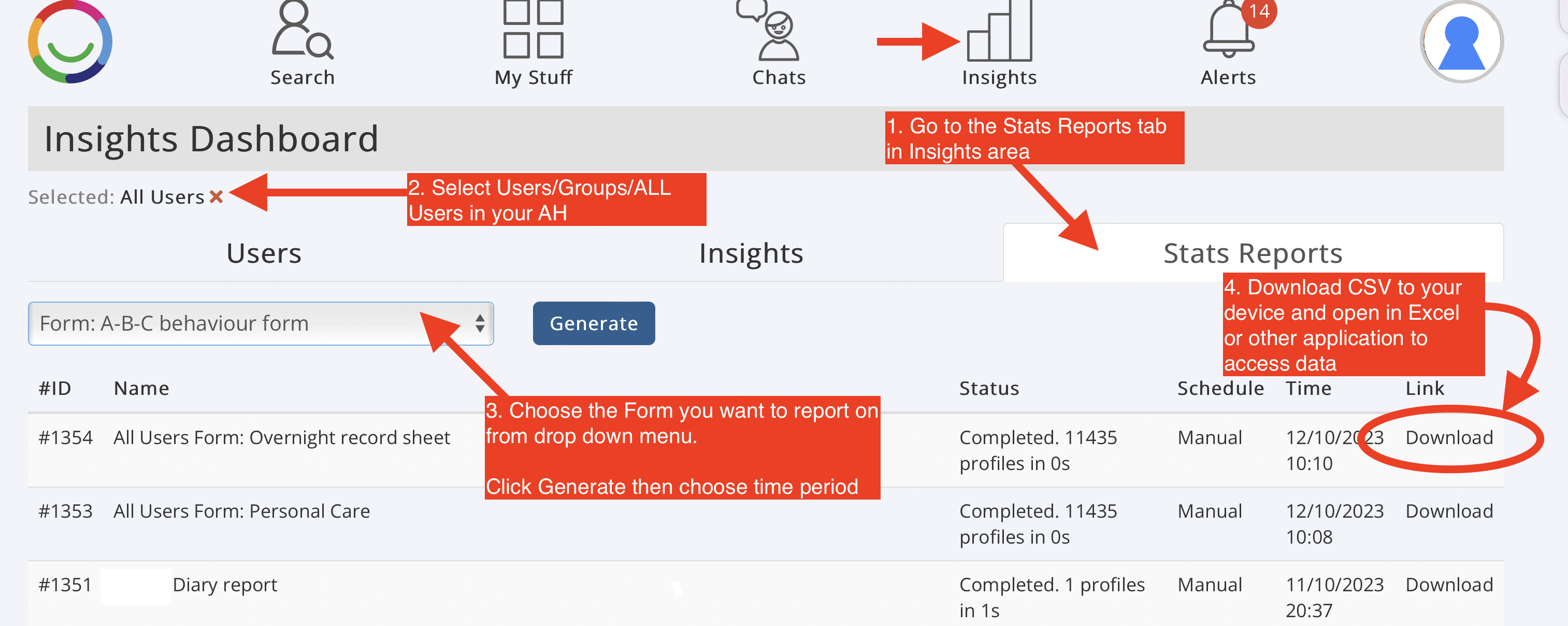
1. Go to Insights> Stats Reports tab
2. Select the users/groups you want to report on (default is all users in your Account)
3. Choose from the form on the Form you want to report on (you can only select one at a time) then click Generate, you will be asked to select the time-frame you want to report on too
4. Wait until the data is ready then download to your device
Was this article helpful?
That’s Great!
Thank you for your feedback
Sorry! We couldn't be helpful
Thank you for your feedback
Feedback sent
We appreciate your effort and will try to fix the article