You can create a new Goal for something you want to achieve.
Getting started
There are two ways to create a new Goal:
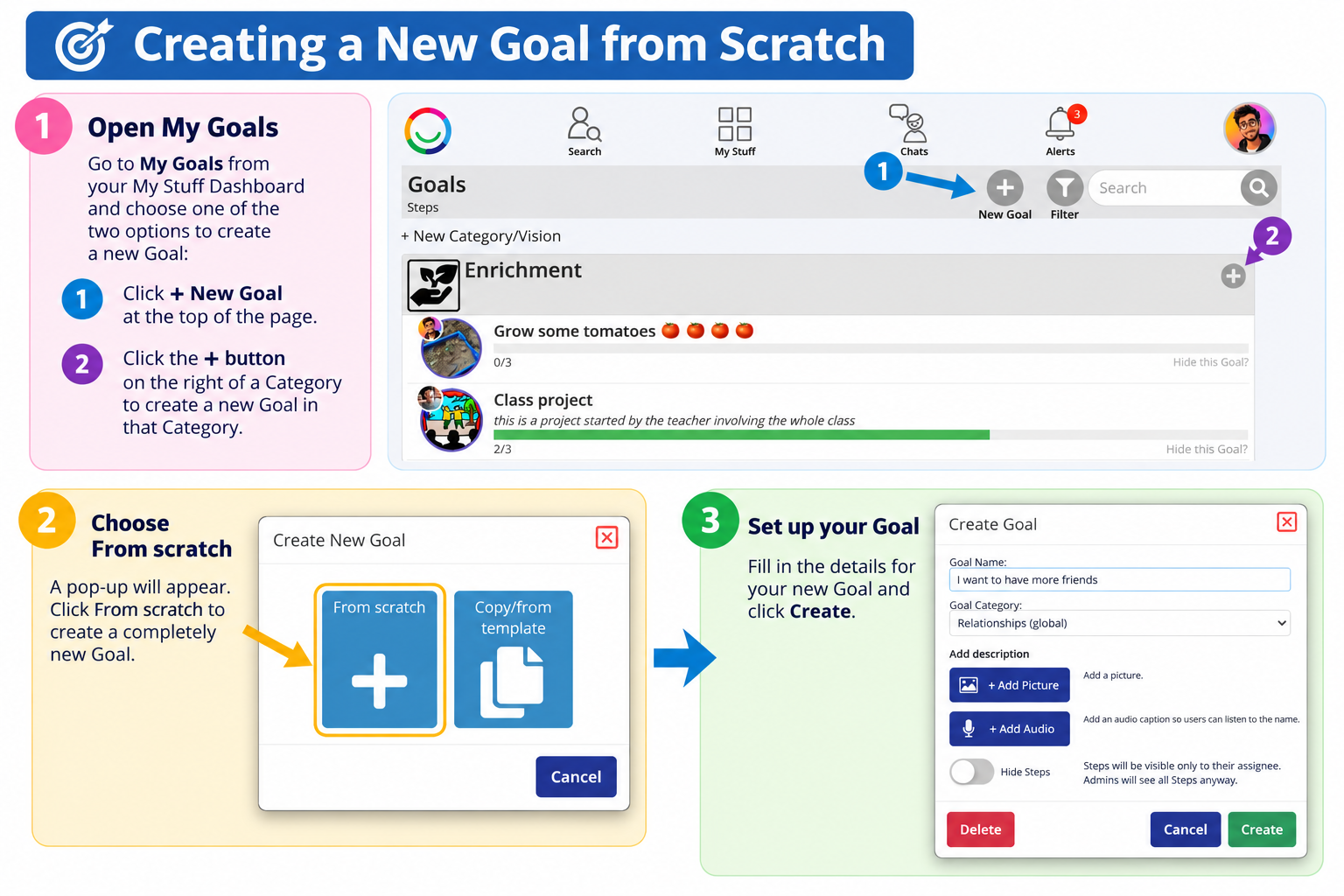
From the top of your Goals List Page: Click the + New Goal button.
From an existing Category: Click the + button on the right-hand side of the Category heading. Your new Goal will be created within that Category.
Next, choose From scratch.
Setting up your Goal
Goal Name (required) – Give your Goal a name, such as I want to have more friends.
Goal Category – Choose a Category, such as Relationships, Independence or Health & Wellbeing. You can create your own Category from the Goals List Page before starting.
Description (optional) – Add more information about what you want to achieve.
Add Picture (optional) – Choose a picture for your Goal. If you don't add one, your Goal can use pictures linked to its Steps.
Add Audio (optional) – Record an audio caption so people can listen to your Goal's name.
Hide Steps (optional) – Switch this on if you don't want people working on the same Goal to see each other's Steps. Each person will only see their assigned Steps, while administrators can still see all Steps.
Click Create to save your Goal.
Your new Goal is ready!
You can now add smaller Steps to help you work towards achieving it.
Was this article helpful?
That’s Great!
Thank you for your feedback
Sorry! We couldn't be helpful
Thank you for your feedback
Feedback sent
We appreciate your effort and will try to fix the article