As a Diary Admin, you can add, edit or remove questions in an existing Diary Log.
How to edit Diary Log questions
Open the person's Diary.
Click the three dots (Show More Options) and select Settings.
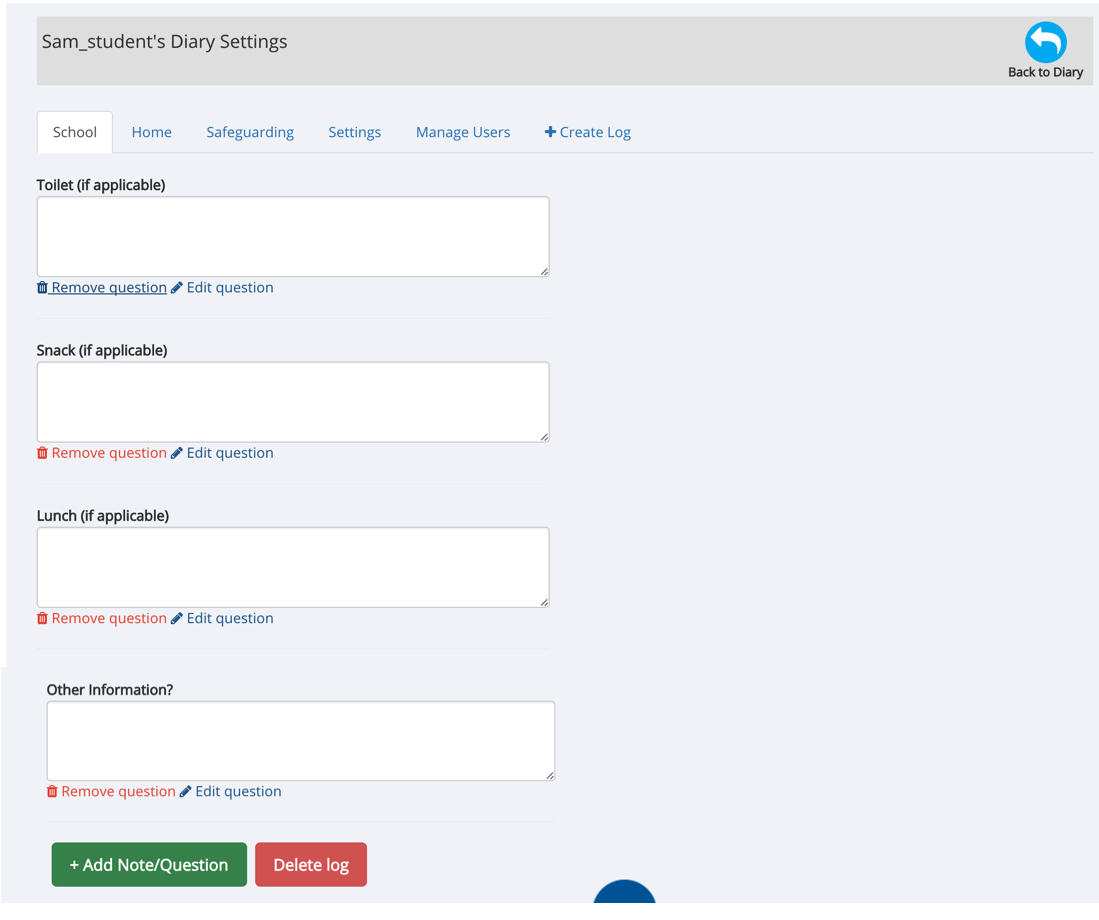
Select the Diary Log tab you want to edit.
Find the question you want to change.
Click Edit Question to update the question or its answer options.
Click Save to confirm your changes.
Other options
At the bottom of each Diary Log, you can also:
Add Note/Question – create another question or text field.
Remove Question – remove an existing question.
Delete Log – delete the entire Diary Log.
Important: Take care when changing questions in a Diary Log that is already in use, particularly where it contains care records or other important information.
If the Diary is linked to an organisational template, changes to the master template may also affect its questions and Logs.
Was this article helpful?
That’s Great!
Thank you for your feedback
Sorry! We couldn't be helpful
Thank you for your feedback
Feedback sent
We appreciate your effort and will try to fix the article